dbcturbo
High-Performance Streaming Reader for 'DATASUS' DBC Files
A modern, memory-efficient R package for reading and converting DBC files produced by the Brazilian Ministry of Health's 'DATASUS' system. DBC files are DBF databases compressed with the 'PKWare' implode algorithm. Unlike 'read.dbc', this package processes files in streaming mode, never loading the full dataset into RAM. It can export directly to CSV or DBF and provides R helpers for in-memory reading and Parquet conversion.
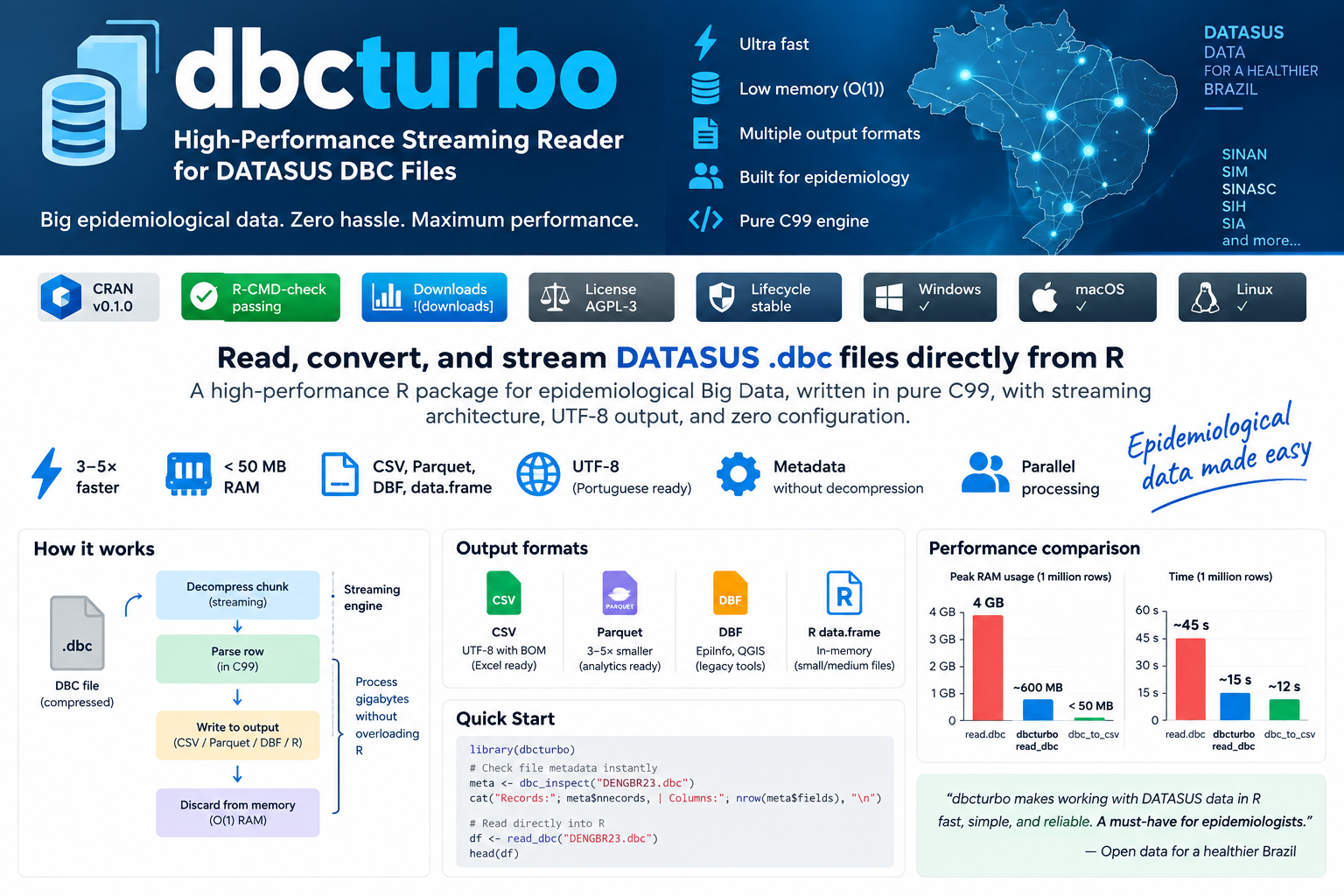




dbcturbo is an R package to inspect, read, and convert DATASUS .dbc files, with direct streaming CSV/DBF conversion and UTF-8 CSV output.
The C99 engine writes CSV rows directly from the decompression stream with bounded memory. read_dbc() uses a direct native reader for files up to 50 MiB by default and a CSV reader for larger files; it intentionally materializes its final data frame in memory. dbc_to_parquet() uses a temporary CSV before conversion with Arrow.
⚡ Why dbcturbo?
- Reads files with millions of records: Process complete national databases (1.6M+ rows) in seconds.
- Streaming architecture: True chunk-by-chunk decompress and write cycle — peak RAM never grows with file size during CSV/DBF conversion.
- Small-file fast path: Native decoding avoids CSV and DBF temporary files for low-latency reads.
- Bounded conversion memory: CSV/DBF conversion keeps only one DBF record and its output buffer in memory.
- Clean UTF-8 output: Automatic CP850/Latin1 transcoding with UTF-8 BOM — Portuguese characters (
ã,ç,é) render perfectly in Excel. - Parquet conversion: Converts through a temporary CSV using
arrow. - Thread-safe conversion engine: No global mutable C state; callers control any parallelism.
- Pure C99 & cross-platform: Zero external C library dependencies — compiles out of the box on Linux, macOS, and Windows.
🥊 Feature Comparison
| Feature | dbcturbo |
read.dbc |
|---|---|---|
| Streaming conversion in batches | ✅ | ❌ |
| Clean UTF-8 output with BOM | ✅ | ❌ |
| Parquet conversion via Arrow | ✅ | ❌ |
| Direct CSV export | ✅ | ❌ |
| Inspect metadata without decompressing | ✅ | ❌ |
| Directory batch conversion | ✅ | ❌ |
| Thread-safe C99 engine | ✅ | ❌ |
| Bounded-memory CSV/DBF conversion | ✅ | ❌ |
⚙️ How the Streaming Engine Works
Unlike traditional readers that load the entire compressed and uncompressed DBF payload into RAM simultaneously, dbcturbo processes records iteratively:
       ┌──────────────┐
       │   .dbc File  │  Compressed DATASUS database
       └──────┬───────┘
              │
              ▼
   ┌──────────────────────┐
   │ blast() Decompressor │  64 KB chunk decompression
   └──────────┬───────────┘
              │
              ▼
   ┌──────────────────────┐
   │  C99 Parsing Engine  │  Parse row + transcode encoding to UTF-8
   └──────────┬───────────┘
              │
              ▼
   ┌──────────────────────┐
   │ Stream Write to Disk │  Write batch to CSV / DBF
   └──────────┬───────────┘
              │
              ▼
   ┌──────────────────────┐
   │   Discard from RAM   │  Bounded memory for CSV / DBF conversion
   └──────────────────────┘
📊 Performance
Performance depends on the file, encoding, storage device, batch size, and
hardware. On a local Ubuntu test, converting DENGBR23.dbc (1,645,956 rows,
121 fields) to CSV completed in 7.78 seconds. Re-run benchmarks on the target
machine before relying on a throughput estimate.
⚡ Quick Start
library(dbcturbo)

# Check file metadata instantly (no decompression needed)
meta <- dbc_inspect("DENGBR23.dbc")
cat("Records:", meta$nrecords, "| Columns:", nrow(meta$fields), "\n")
#> Records: 1,645,956 | Columns: 121

# Small files use the native C reader automatically (up to 50 MiB)
df <- read_dbc("small_file.dbc")
head(df)
For large files, install the optional data.table package. read_dbc() will
use it automatically above the native threshold, or request it explicitly with
engine = "data.table"; use engine = "native" to force direct native
decoding and engine = "base" to force R's built-in reader.
install.packages("data.table")
df <- read_dbc("DENGBR23.dbc", engine = "data.table")
📦 Installation
# From CRAN (stable)
install.packages("dbcturbo")

# From GitHub (development)
remotes::install_github("GPimentel14/dbcturbo")
Requirements: A standard C compiler is needed to build from source — Rtools on Windows, or GCC/Clang on Linux/macOS. CRAN binaries require no compiler.
🔧 Output Formats
Choose the format that best fits your workflow:
1. 📊 In-Memory Data Frame (small to medium files)
library(dbcturbo)
df <- read_dbc("DENGBR23.dbc")
head(df)
2. 📄 CSV — Universal, UTF-8 encoded
Outputs a clean UTF-8 CSV with BOM — Portuguese characters (ã, ç, é) display correctly in Excel without configuration.
library(dbcturbo)
# Select fields in the C writer to reduce output size and downstream work
dbc_to_csv(
  "DENGBR23.dbc", "dengue_2023.csv",
  cols = c("DT_NOTIFIC", "SG_UF_NOT", "NU_IDADE_N"),
  verbose = TRUE
)
3. 🗜️ Parquet — Conversion through a temporary CSV
Parquet is columnar and convenient to query with R (arrow), Python (pandas, polars), Power BI, and DuckDB. The conversion first creates a temporary CSV, so ensure enough temporary disk space is available.
library(dbcturbo)
dbc_to_parquet("DENGBR23.dbc", "dengue_2023.parquet")
⚠️ Always use
.parquetas the output extension. Passing a.csvpath todbc_to_parquet()will raise an informative error.
4. 🗂️ DBF — Legacy compatibility
For EpiInfo, QGIS, and other tools that read dBase format.
library(dbcturbo)
dbc2dbf("DENGBR23.dbc", "dengue_2023.dbf")
5. 🔍 Metadata Inspection (Header-only, no decompression)
library(dbcturbo)
meta <- dbc_inspect("DENGBR23.dbc")
print(meta$nrecords)   # total records
print(meta$fields)     # field names, types, widths, decimals
⚠️ Excel Row Limit
Microsoft Excel supports a maximum of 1,048,576 rows.
Many national DATASUS files (e.g., Dengue, SINASC) exceed this limit.
Solution — filter in R before exporting:
library(dbcturbo)

df <- read_dbc("DENGBR23.dbc")

# Filter to one state (two-digit IBGE code)
df_rs <- df[df$SG_UF_NOT == "43", ]   # Rio Grande do Sul
df_sp <- df[df$SG_UF_NOT == "35", ]   # São Paulo

# Now it fits in Excel
write.csv(df_rs, "dengue_2023_RS.csv", row.names = FALSE)
Common state codes: "35" SP · "33" RJ · "43" RS · "41" PR · "29" BA · "13" AM
🔬 Practical Epidemiology Examples
Decode DATASUS age encoding (NU_IDADE_N)
decode_age <- function(x) {
  x <- as.integer(x)
  unit  <- x %/% 1000
  value <- x %%  1000
  ifelse(unit == 4, value,
  ifelse(unit == 3, value / 12,
  ifelse(unit == 2, value / 365,
  ifelse(unit == 1, value / 8760, NA_real_))))
}
df$age_years <- decode_age(df$NU_IDADE_N)
Calculate notification delays
# read_dbc() already returns DBF date fields as Date by default
df$delay_days <- as.numeric(df$DT_NOTIFIC - df$DT_SIN_PRI)
Convert a directory of DBC files
result <- dbc_batch_to_csv(
  input_dir  = "dbc/2023/",
  output_dir = "csv/2023/",
  recursive  = TRUE,
  workers    = 4L # macOS/Linux; use 1L on Windows
)
Parallel conversion
parallel::mclapply() uses multiple processes on macOS and Linux. On Windows,
use dbc_batch_to_csv() sequentially or a Windows-compatible parallel backend.
library(parallel)
files <- list.files("datasus/", pattern = "\\.dbc$", full.names = TRUE)
mclapply(files, function(f) {
  dbc_to_csv(f, sub("\\.dbc$", ".csv", f))
}, mc.cores = 4L)
DuckDB SQL on Parquet (zero RAM overhead)
library(duckdb)
con <- dbConnect(duckdb())
dbGetQuery(con, "
  SELECT SG_UF_NOT, COUNT(*) AS cases
  FROM 'dengue_2023.parquet'
  GROUP BY SG_UF_NOT ORDER BY cases DESC
")
dbDisconnect(con)
📚 Documentation
- Full vignette:
vignette("introduction", package = "dbcturbo") - Function reference:
?dbc_to_csv,?dbc_to_parquet,?read_dbc,?dbc_inspect
📖 Citation
If you use dbcturbo in your research or institutional pipelines, please cite it:
@Manual{,
  title  = {dbcturbo: High-Performance Streaming Reader for DATASUS DBC Files},
  author = {Gumercindo {Pimentel Peralta} and Juliana {da Silva}},
  year   = {2026},
  note   = {R package version 0.2.0},
  url    = {https://github.com/GPimentel14/dbcturbo},
}