doclingr
Document Intelligence via 'Docling'
An interface to 'Docling', a document-understanding library that converts 'PDF', 'DOCX', 'PPTX', 'HTML' and image documents into structured, AI-ready data. The package wraps the 'Docling' 'Python' package through 'reticulate' to extract layout-aware text, tables and metadata, export to 'Markdown' or 'JSON', and split documents into context-rich chunks suitable for retrieval-augmented generation (RAG) and embedding pipelines.
doclingr 
Document intelligence for R — turn messy PDFs, Office files and HTML into AI-ready, structured data.






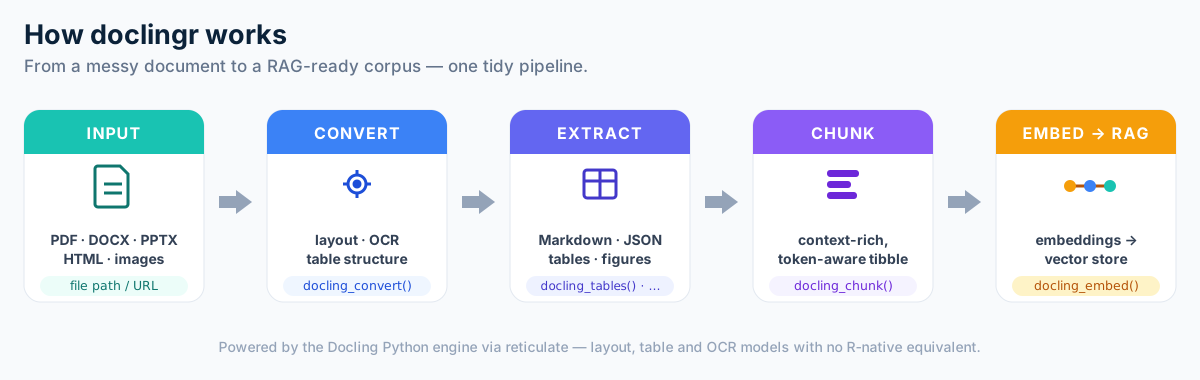
doclingr is an R interface to Docling, an open-source document-understanding library. It brings layout-aware PDF/DOCX/PPTX/HTML parsing, table extraction, OCR and RAG-ready chunking to R, exposing it through a small, tidy-friendly API built on reticulate.
R already has pdftools, tabulizer, officer, readtext and friends, but no
single "document intelligence for RAG" package. doclingr aims to fill that gap:
take a document, understand its layout, extract its tables, preserve its
structure, chunk it, and hand it back ready for search and embeddings.
How it works
Installation
# install.packages("pak")
pak::pak("StrategicProjects/doclingr")
doclingr talks to the Docling Python package via reticulate. Install the backend once:
library(doclingr)
install_docling()      # creates an "r-docling" Python environment
# restart R
docling_available()    # TRUE
Usage
library(doclingr)

doc <- docling_convert("https://arxiv.org/pdf/2408.09869")

# Export
as_markdown(doc)       # layout-aware Markdown
as_json(doc)           # structured DoclingDocument as an R list

# Pages and tables
docling_n_pages(doc)
tables <- docling_tables(doc)   # list of tibbles
tables[[1]]

# Figures -> tibble (captions, pages, optional saved images)
doc <- docling_convert("paper.pdf", images = TRUE)
docling_figures(doc, image_dir = "figures")

# RAG-ready chunks -> tibble
chunks <- docling_chunk(doc, max_tokens = 512)
chunks$text[1]

# Match your embedding model's tokenizer for accurate budgets
chunks <- docling_chunk(doc, tokenizer = "BAAI/bge-small-en-v1.5", max_tokens = 512)
From chunks to embeddings
doclingr stays provider-agnostic: bring any embedding function (an API call, a
local model via reticulate, ...) and docling_embed() handles batching and tidy
assembly into an embedding list-column.
embed_openai <- function(txt) {
  # your call to an embeddings API -> matrix (one row per text)
}

doc |>
  docling_chunk(max_tokens = 512) |>
  docling_embed(embed_openai, batch_size = 64)
#> # adds `embedding` (list-column) and `n_dim` columns
Why Docling, why reticulate?
Docling's quality comes from deep-learning models (layout analysis, the
TableFormer table-structure model, OCR). Those have no R-native equivalent, so
doclingr binds the maintained Python implementation rather than reimplementing
it — the same strategy used by tensorflow, keras and spacyr. You get
upstream parity for free; doclingr focuses on an idiomatic, tidy R surface.
Status
Actively developed and heading to CRAN. The public API is settling but may still change before 1.0. Contributions and issues are welcome at https://github.com/StrategicProjects/doclingr.
License
MIT © doclingr authors