palettome
Hierarchy-Aware, Interactively Editable Color Palettes for Clusters
Assigns perceptually-informed color palettes to clustered data
(e.g. scRNA-seq clusters / cell subtypes from 'Seurat' or plain UMAP
coordinate tables), where clusters that belong to the same "family"
(e.g. subtypes of T cells) can be colored either harmoniously (shared
hue, varying shade) or with maximal contrast (with family membership
encoded via a secondary channel). Families can be auto-detected from
embedding-space hierarchical clustering or supplied explicitly, and
every generated color remains individually overridable, with manual
overrides preserved across regeneration. Colors are constructed in the
HCL space as in Zeileis et al. (2020)
Palettome
Hierarchy-aware, interactively editable color palettes for clustered data — built for scRNA-seq clusters/cell subtypes (Seurat, UMAP) but not hard-dependent on Seurat.
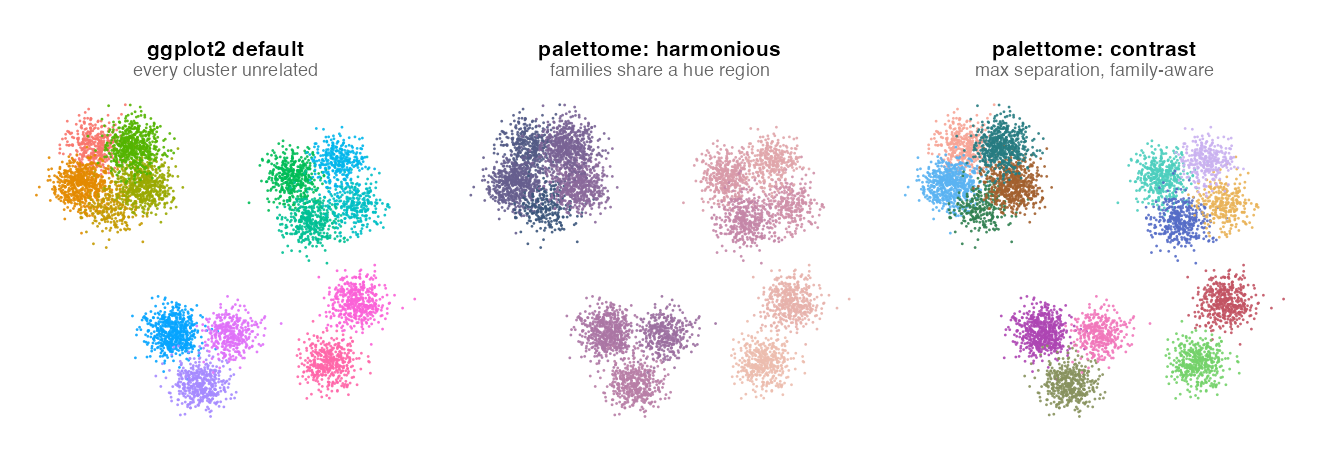
LLM was used in this project to speed up the development.
Clusters that belong to the same family / compartment (e.g. subtypes of T cells, subtypes of myeloid cells) can be colored either:
- harmonious — a coordinated palette in a perceptually uniform space.
harmonious_style = "sweep"(default) lays the families along one analogous hue arc with a shared monotone lightness ramp and muted chroma (e.g. a smooth blue → purple → rose → tan progression is just one example — a differentseedgives a genuinely different arc: green, teal, red, gold, ..., not a small jitter around one fixed look — andsweep_anchorslets you specify the exact gradient to sweep through instead of an automatic one);harmonious_style = "per_family"gives each family its own hue and colors its members as graded shades of it. - contrast — every cluster gets a maximally distinguishable color (greedy max-min selection in Lab space), with family membership still visible through a secondary color channel (the family's own accent/tag color).
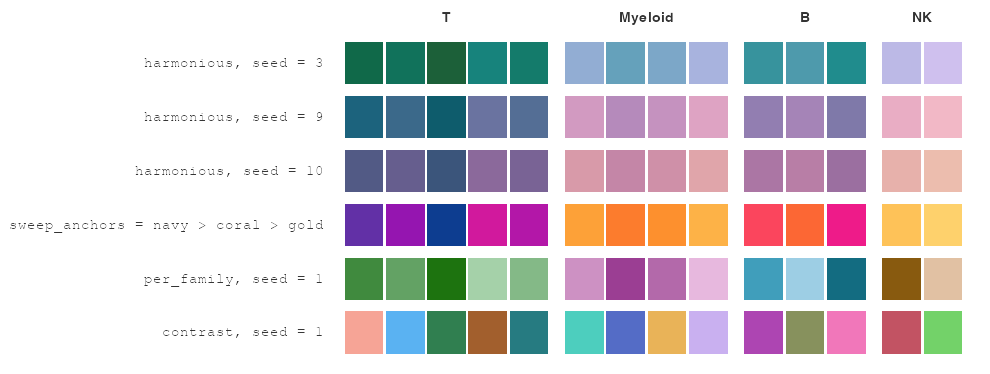
Color choice is color-theory aware even for random seeds: chroma is kept
inside the displayable gamut and away from the neon and muddy yellow-green
zones, hues are spread with a low-discrepancy sequence, and each hue gets
its natural lightness. When neighbor information is supplied, families that
are adjacent in the embedding get contrasting hues by default (or
analogous, by choice — neighbor_hues), and within a family
spatially-adjacent clusters are given far-apart shades for local contrast.
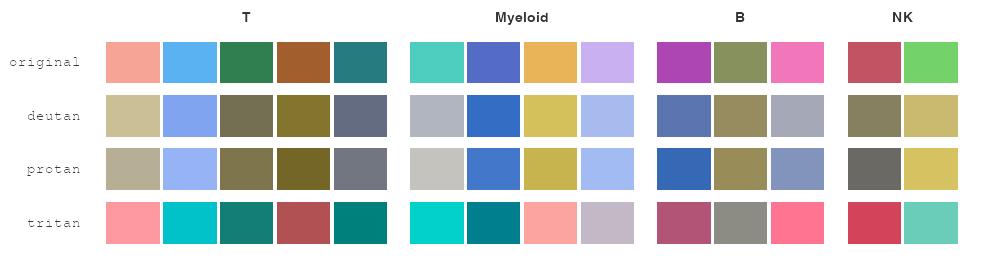
simulate_cvd() and the cvd argument of the plotting functions preview a
palette as it appears with color-vision deficiency:
Every generated color can be overridden by hand, and manual overrides survive re-running the generator (new mode, new seed, edited families) until explicitly reset; while manual overrides are in place the remaining colors auto-fit to the lightness/chroma envelope of your picks.
Core vs. UI
Core is fully independent of the UI. as_cluster_data(),
detect_families(), generate_palette(), plot_palette_static(),
plot_swatches(), export_palette_json()/export_palette_csv(),
import_palette_json(), downsample_stratified(), color_distance(), and
simulate_cvd() depend only on colorspace, farver, stats, graphics,
methods, utils, and jsonlite — all listed in Imports, so a plain
install.packages("palettome") (or devtools::load_all()) gives you a
fully working package with zero UI packages installed.
The interactive UI is exactly one function, launch_palettome_ui(). It
requires shiny, plotly, colourpicker, and shinyjs, all listed under
Suggests only. If they aren't installed, launch_palettome_ui() fails
with a message telling you which packages to install and reminding you that
every other function still works without them — it never blocks or breaks
the rest of the package.
| Function | Core or UI |
|---|---|
as_cluster_data(), compute_centroids() |
Core |
detect_families(), compute_family_dendrogram(), cut_families(), plot_dendrogram() |
Core |
generate_palette(), set_manual_color(), reset_overrides(), optimize_color() |
Core |
cluster_colors(), family_colors() |
Core |
color_distance(), simulate_cvd() |
Core |
downsample_stratified() |
Core |
plot_palette_static(), plot_swatches() |
Core (ggplot2 used opportunistically if installed; base-R fallback otherwise) |
export_palette_json(), export_palette_csv(), import_palette_json() |
Core |
launch_palettome_ui() |
UI (Suggests-only: shiny, plotly, colourpicker, shinyjs) |
Quick start (core only)
devtools::load_all()  # or library(palettome) once installed

pdata <- as_cluster_data(
  my_df,
  coord_cols = c("UMAP_1", "UMAP_2"),
  cluster_col = "cluster"
)

fam <- detect_families(pdata, k = 4)          # auto-detect via hclust

# fam$neighbors carries centroids (or a connectivity matrix) so families and
# clusters can be placed in space — pass it through for neighbor-aware color
session <- generate_palette(
  fam$assignment,
  mode = "harmonious", harmonious_style = "sweep",
  neighbors = fam$neighbors, seed = 1
)

plot_palette_static(pdata, session)           # ggplot2 if installed, base R otherwise
plot_swatches(session)                        # family-grouped swatch legend
export_palette_json(session, "palette.json")
Key generate_palette() arguments:
| argument | meaning |
|---|---|
mode |
"harmonious" or "contrast" |
harmonious_style |
"sweep" (one analogous multi-hue sweep) or "per_family" (one hue per family, shaded) |
sweep_anchors |
(sweep only) 2+ hex colors to interpolate the sweep through, instead of the automatic gradient |
neighbor_hues |
"contrast" / "coherent", or NULL to follow the mode (contrast→contrast, harmonious→coherent) |
neighbors |
centroids data frame or connectivity matrix; NULL disables neighbor-aware placement |
lightness_range, chroma_range |
length-2 numeric, or "auto" (default): derived from manual picks if any, else from mode/style presets |
seed, hue_range, cvd |
random seed; hue window in degrees; "none"/"deutan"/"protan"/"tritan" |
To resume editing later, or hand off manual overrides:
session <- set_manual_color(session, cluster = "3", color = "#2E5A87")
# several at once: one color each (or a single color for all); ids not in
# the session are skipped with a warning
session <- set_manual_color(session, cluster = c("4", "5"), color = c("#6E6E6E", "#C9A227"))
session2 <- generate_palette(fam$assignment, session = session, mode = "contrast")
# clusters/families with manual_color == TRUE keep their color unchanged;
# with lightness_range/chroma_range = "auto" the rest fit to the manual picks

optimize_color("#7B00FF", session = session2)  # snap a hand-picked hex into the palette envelope
Different seeds give genuinely different sweep gradients (not a small jitter around one look), or specify the exact gradient yourself:
generate_palette(fam$assignment, mode = "harmonious", seed = 7)  # try a few seeds
generate_palette(fam$assignment, mode = "harmonious",
  sweep_anchors = c("#0B3D91", "#FF5733", "#FFD166"))            # your own gradient
session$clusters/session$families are already plain data frames (see
the JSON schema below), but for the common case of just needing the colors
themselves -- to hand to Seurat::DimPlot(cols = ...),
ggplot2::scale_color_manual(values = ...), etc. -- use:
cluster_colors(session)                     # named vector: c(c1 = "#4E5716", c2 = "#899925", ...)
cluster_colors(session, format = "data.frame") # data frame: cluster, color
family_colors(session)                      # same, one row per family
Working with a Seurat object
as_cluster_data() has a Seurat method, so you don't need to hand-extract
embeddings/metadata yourself:
pdata <- as_cluster_data(
  seurat_obj,
  reduction = "umap",           # any reduction name (Seurat::Embeddings())
  dims = 1:2,                   # or 1:3 for a 3D embedding
  cluster_col = "seurat_clusters", # any column of seurat_obj[[]]
  family_col = NULL             # optional: a metadata column with an explicit parent/family label
)
# from here on it's identical to the data-frame path:
fam <- detect_families(pdata, k = 4)
session <- generate_palette(fam$assignment, mode = "harmonious", seed = 1)

# hand the result back to Seurat's own plotting:
Seurat::DimPlot(seurat_obj, reduction = "umap", group.by = "seurat_clusters",
                cols = cluster_colors(session))
This method requires the Seurat package (Suggests-only, checked with a
friendly error if missing) but nothing else in the package does -- everything
downstream of as_cluster_data() only ever sees the plain palettome_data
structure either input path produces.
Interactive UI
install.packages(c("shiny", "plotly", "colourpicker", "shinyjs"))
session <- launch_palettome_ui(pdata)                    # auto-detects families
session <- launch_palettome_ui(pdata, session = session) # resume a saved session
cluster_colors(session)                                  # your edited colors
launch_palettome_ui() returns the edited session when the app closes --
either via the Done -- return session to R button or by interrupting R
(Esc / Ctrl+C) -- so assigning its result keeps every change made in the UI.
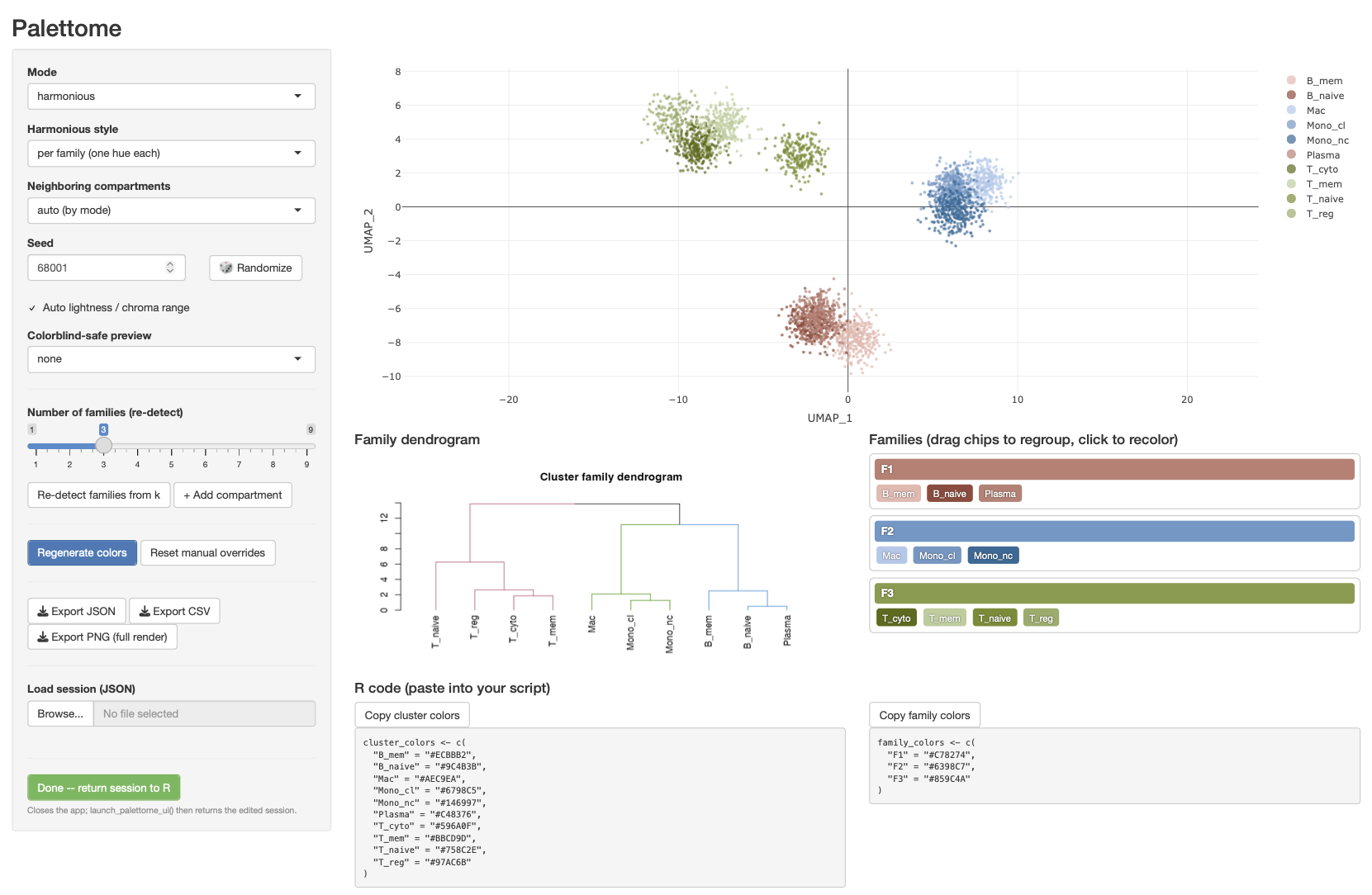
The app shows a WebGL (plotly scattergl) scatter plot of the embedding
(fixed 1:1 x/y aspect ratio, so distances aren't visually distorted), a
family dendrogram, and a drag-and-drop compartment panel: drag a cluster
chip into a different family bin to regroup it, hit + Add compartment to
make a new (empty, dashed) bin to drag clusters into, and empty compartments
are removed automatically. Mode, harmonious style, neighbor-hue rule, seed,
and a colorblind simulation preview are all live. Hit 🎲 Randomize next
to the seed for a fresh sweep gradient at a click, or type 2+ comma-
separated hex colors into Custom gradient anchors to sweep through your
own colors instead of an automatic gradient (a live swatch strip previews
what you typed). When the auto light/chroma toggle is switched off, the
Lightness- and Chroma-range sliders each get a swatch strip underneath
rendered in the current palette's own hue, dimmed outside the selected
sub-range -- so the numeric range reads as actual colors, not just two
numbers. An R code panel shows the current cluster and family colors as
named-vector R code (cluster_colors <- c("3" = "#2E5A87", ...)) with a
copy button, ready to paste into a script. Sessions export as JSON/CSV, and
the final plot exports as a full-resolution PNG.
Click anywhere on a chip or a family's whole color bar (not just its label) to open the recolor dialog:
- The hex/swatch picker and three raw HSL sliders (Hue/Saturation/ Lightness -- the everyday color-picker model, distinct from the HCL space the generator itself reasons in) both edit the same color and stay in sync either direction; nothing stops you from picking a color the generator would never have chosen -- that's the point of exposing raw controls, and the algorithm won't fight you on it.
- A live readout underneath always shows both the color's raw HSL and its perceptual HCL (hue/chroma/lightness) breakdown, so you can see the actual parameters behind whatever's currently in the box, program-picked or hand-edited.
- Optimize snaps the current color's lightness/chroma into the
palette's envelope while keeping its hue (calls
optimize_color()). - Recoloring a family immediately reshades its non-manual member clusters around the new hue (in both harmonious styles) -- pick a family's color and its subclusters update automatically, rather than needing a separate "Regenerate colors" click.
The JSON schema (stable contract)
export_palette_json() writes, and import_palette_json() reads, this
structure. It is deliberately plain and language-agnostic — a future
Python/Scanpy implementation can read and write the exact same file without
any R-specific types.
{
  "schema_version": "1.0",
  "clusters": [
    { "cluster": "0", "family_id": "F1", "color": "#3E7CB1", "manual_color": false, "n_cells": 1523 },
    { "cluster": "1", "family_id": "F1", "color": "#7FB1DA", "manual_color": true,  "n_cells": 842 }
  ],
  "families": [
    { "family_id": "F1", "color": "#2C5F8A", "manual_color": false }
  ],
  "params": {
    "mode": "harmonious",
    "harmonious_style": "sweep",
    "sweep_anchors": null,
    "neighbor_hues": "coherent",
    "seed": 1,
    "lightness_range": [34, 82],
    "chroma_range": [24, 46],
    "hue_range": [0, 360],
    "cvd": "none",
    "auto_lightness": true,
    "auto_chroma": true
  }
}
clusters[].coloris the per-cluster fill color actually used for plotting.families[].coloris the family's representative/accent color: in harmonious mode it's a point on the family's part of the sweep (or the family's base hue forper_family); in contrast mode it's the secondary channel that shows family membership even though cluster colors themselves are maximally spread apart.manual_color: truemarks an entry a person set by hand;generate_palette()never overwrites these unlessreset_overrides()is called first.n_cellsis informational (legend sizing, etc.) and optional/nullable.params.lightness_range/chroma_rangeare always the resolved numeric ranges;auto_lightness/auto_chromarecord whether they were derived automatically (so a reload can keep auto-fitting).
CSV export (export_palette_csv()) writes the clusters table (and
optionally the families table) as plain CSV with the same column names.
Data input contract
as_cluster_data() accommodates either input into one palettome_data object
so every other function only has to know one shape:
- Data frame:
as_cluster_data(df, coord_cols = c("UMAP_1","UMAP_2"[,"UMAP_3"]), cluster_col = "cluster", family_col = NULL, cell_id_col = NULL) - Seurat object:
as_cluster_data(seurat_obj, reduction = "umap", dims = 1:2, cluster_col = "seurat_clusters", family_col = NULL)(requires theSeuratpackage, Suggests-only)
If family_col/an explicit family is supplied, detect_families() uses it
directly; otherwise it hierarchically clusters cluster centroids (or a
supplied cluster-cluster connectivity/distance matrix) and lets you pick a
cut (k or h), with plot_dendrogram() for a preview. Either way, the
resulting cluster -> family_id assignment is just a plain data frame you
(or the UI's drag-and-drop panel) can freely rewrite afterward — detection
is a starting point, not a final answer.
Performance for large datasets
See inst/benchmark/ for the full write-up. In short:
the browser never receives one point per cell for interactive editing.
downsample_stratified() precomputes a per-cluster-stratified subsample
(default cap 50,000 points) server-side for live dragging/recoloring, and
plotly's WebGL scattergl trace renders that subsample smoothly; a full,
un-subsampled render is only produced on final PNG export via
plot_palette_static(). Cluster centroids, hierarchy, and per-cluster cell
counts are precomputed once (compute_centroids()) so hierarchy edits and
recoloring never touch the raw per-cell table at all.
Tests
devtools::test()
Covers: perceptual-distance thresholds and gamut/muddy-zone constraints for
contrast-mode selection; the harmonious sweep being a monotone-lightness
analogous progression; neighbor_hues switching adjacent families between
analogous and contrasting; spatially-adjacent subclusters getting far-apart
shades; lightness_range = "auto" fitting to manual picks; optimize_color()
preserving hue; and manual overrides surviving generate_palette() re-runs
(including across a family reassignment). Plus unit tests for the
color-theory primitives (R/color_theory.R) and adjacency helpers
(R/adjacency.R).