prompt
Dynamic 'R' Prompt
Set the 'R' prompt dynamically, from a function. The package contains some examples to include various useful dynamic information in the prompt: the status of the last command (success or failure); the amount of memory allocated by the current 'R' process; the name of the R package(s) loaded by 'pkgload' and/or 'devtools'; various 'git' information: the name of the active branch, whether it is dirty, if it needs pushes pulls. You can also create your own prompt if you don't like the predefined examples.
prompt
Dynamic R Prompt



Set the R prompt dynamically, from a function. The package contains some examples.
Examples
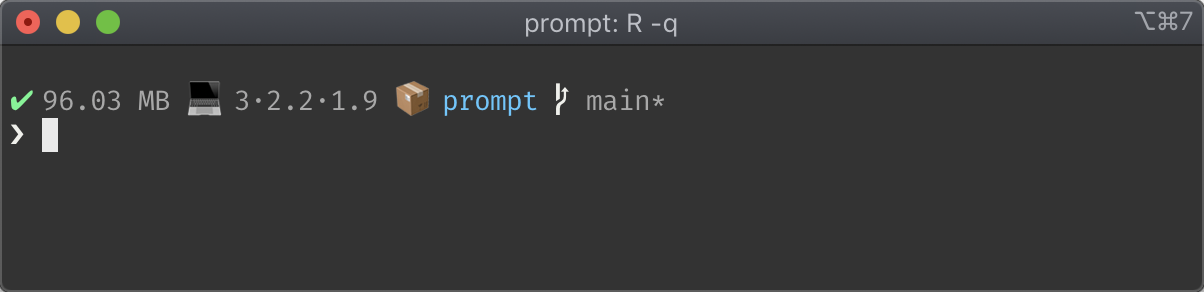
This is prompt_fancy() and it has
- The status of the last command (success or failure).
- The amount of memory allocated by the current R process.
- The name of the R package being developed using devtools.
- Name of the active git branch.
- State of the git working tree (needs pushes, pulls, and/or dirty).

A powerline clone, that also shows the system load average and the current working directory.
Installation
Install the package from CRAN, as usual:
install.packages("prompt")
Usage
Use one of the pre-defined prompts, as on the screenshots, or create your own.
You can set the prompt in your .Rprofile. Maybe you only want to do this
in interactive mode:
if (interactive()) prompt::set_prompt(prompt::prompt_fancy)
or the powerline prompt:
if (interactive()) prompt::set_prompt(prompt::new_prompt_powerline())
License
MIT © Gábor Csárdi