spatialising
Ising Model for Spatial Data
Performs simulations of binary spatial raster data using
the Ising model (Ising (1925)
spatialising



The goal of spatialising is to perform simulations of binary spatial raster data using the Ising model.
Installation
You can install the released version of spatialising from CRAN with:
install.packages("spatialising")
You can install the development version of spatialising from GitHub with:
# install.packages("devtools")
devtools::install_github("Nowosad/spatialising")
Example
The spatialising package expects raster data with just two values,
-1 and 1. Here, we will use the r_start.tif file built in the
package.
library(spatialising)
library(terra)
r1 = rast(system.file("raster/r_start.tif", package = "spatialising"))
plot(r1)
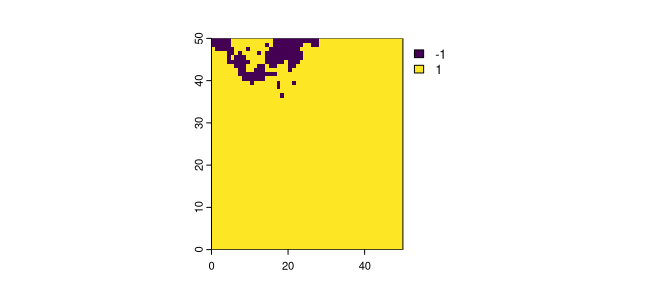
Most of the raster area is covered with the value of 1, and just about
5% of the area is covered with the value of -1. The main function in
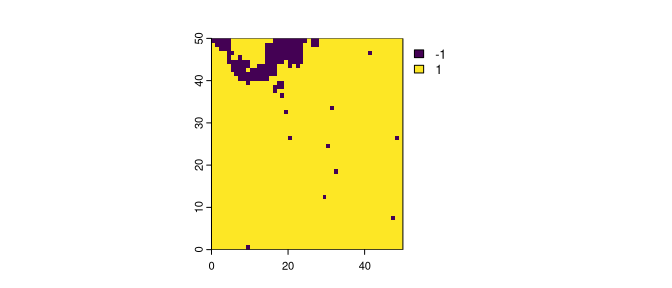
this package is kinetic_ising(). It accepts the input raster and at
least two additional parameters: B – representing external pressure
and J – representing the strength of the local autocorrelation
tendency. The output is a raster modified based on the provided
parameters.
r2 = kinetic_ising(r1, B = -0.3, J = 0.7)
plot(r2)
The kinetic_ising() function also has a fourth argument called
updates. By default, it equals to 1, returning just one raster as
the output. However, when given a value larger than one, it returns many
rasters. Each new raster is the next iteration of the Ising model of the
previous one.
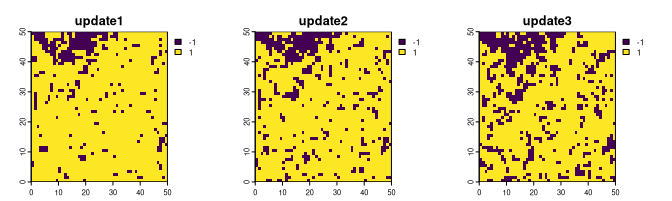
ri1 = kinetic_ising(r1, B = -0.3, J = 0.7, updates = 3)
plot(ri1, nr = 1)
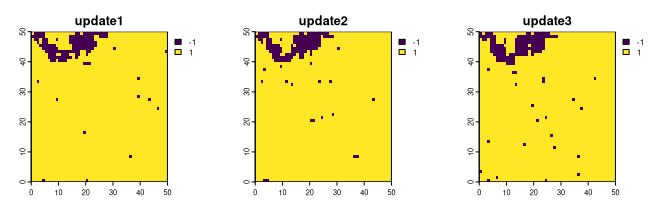
Obtained results depend greatly on the set values of B and J. In the
example above, values of B = -0.3 and J = 0.7 resulted in expansion
of the yellow category (more -1 values).
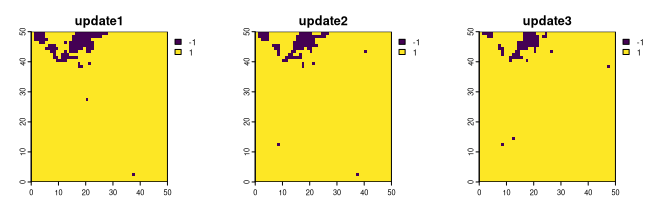
On the other hand, values of B = 0.3 and J = 0.7 give a somewhat
opposite result with less cell with the yellow category:
ri2 = kinetic_ising(r1, B = 0.3, J = 0.7, updates = 3)
plot(ri2, nr = 1)
Finally, in the last example, we set values of B = -0.3 and J = 0.4.
Note that the result shows much more prominent data change, with a
predominance of the yellow category only after a few updates.
ri3 = kinetic_ising(r1, B = -0.3, J = 0.4, updates = 3)
plot(ri3, nr = 1)
Documentation
Read the related article:
- Stepinski, T. F. & Nowosad, J. (2023). The kinetic Ising model encapsulates essential dynamics of land pattern change, Royal Society Open Science, https://doi.org/10.1098/rsos.231005
Contribution
Contributions to this package are welcome - let us know if you have any suggestions or spotted a bug. The preferred method of contribution is through a GitHub pull request. Feel also free to contact us by creating an issue.