mcp
Regression with Multiple Change Points
Flexible and informed regression with Multiple Change Points. 'mcp' can infer change points in means, variances, autocorrelation structure, and any combination of these, as well as the parameters of the segments in between. All parameters are estimated with uncertainty and posterior predictive intervals are supported - also near the change points. 'mcp' supports hypothesis testing via Savage-Dickey density ratio, posterior contrasts, and PSIS-LOO model comparison. The 'mcp' framework is introduced in Lindeløv (2020)
mcp: Regression with Multiple Change Points


mcp is regression with multiple change points, inferring full Bayesian
uncertainty for all parameters, including the change points themselves.
At its simplest, it feels like lm() with one formula per segment. At
its most flexible, it aims to be
brms for change points:
-
GLMM and distributional regression: Gaussian, binomial, Bernoulli, Poisson, and Negative Binomial families. Group-level (random) effects, AR/MA, and regression on distributional parameters (e.g.,
sigma,shape). -
Express expert knowledge: Specify the number of change points, the form of each segment, and restrict coefficients via priors. Compare hypotheses using
loo()andhypothesis(). -
Native feel:
summary(),plot_pars(),pp_check(), andas_draws_df()follow the conventions ofbrms,rstanarm, andposterior, adapted to change point regression. Inspect the sampled JAGS model infit$jags_code.
mcp has 200+ academic
citations
across ecology, astronomy, neuroscience, epidemiology, and other
disciplines. You will find many aliases for change point regression in
the literature, including piecewise linear, discontinuity, segmented,
and broken stick regression.
Install
Install mcp from CRAN:
install.packages("mcp")
or install the development version from GitHub:
if (!requireNamespace("remotes")) install.packages("remotes")
remotes::install_github("lindeloev/mcp@dev")
mcp uses JAGS through rjags. If installation of rjags reports that
JAGS headers or libraries are missing, install JAGS
4.x and
rerun the mcp installation. JAGS 5 is supported when rjags 5 is
released.
At a glance
mcp takes a list of formulas - one for each segment:
library(mcp)

model = list(
  response ~ 1,  # plateau (Intercept_1)
  ~ 0 + time,    # joined slope (time_2) at cp_1
  ~ 1 + time     # disjoined slope (Intercept_3, time_3) at cp_2
)

data = mcp_example_data("demo")
fit = mcp(model, data)
The change points are the values of the change-point variable (here
time) where the model switches from one formula to the next. The first
formula is just response ~ predictors and the most common formula for
segment 2+ would be ~ predictors (more details
here).
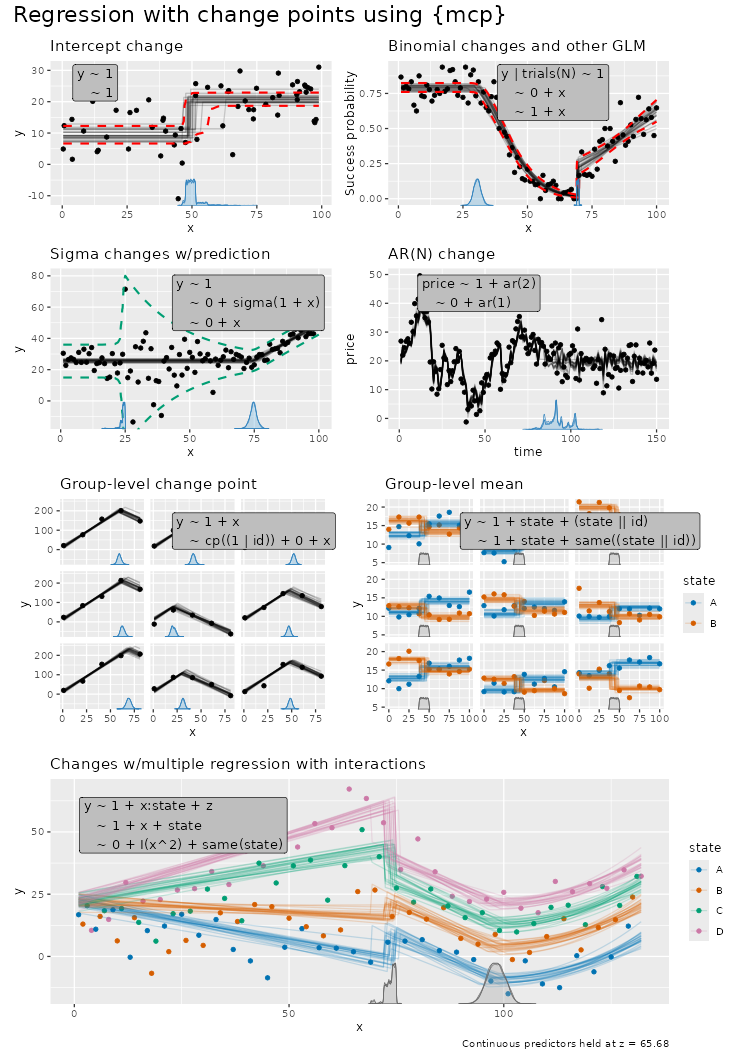
You can do change point regression for a large number of models in a
syntax that aligns with lm()/glm()/brms. E.g.:
Brief worked example
The following model infers the two change points between three segments. You can run this complete worked example (which fits the model and plots by default) in one line:
library(mcp)
demo_fit = mcp_example("demo")  # Also check out other examples
See demo_fit$example_code for how it was generated, and explore more
demos in mcp_example(). But for now, let’s walk through the example
manually:
# Define the model
model = list(
  response ~ 1,  # plateau (Intercept_1)
  ~ 0 + time,    # joined slope (time_2) at cp_1.
  ~ 1 + time     # disjoined slope (Intercept_3, time_3) at cp_2
)

# Get example data and fit it: mcp(model, data, ...)
fit = mcp(model, demo_fit$data, sample = "both")
Plot and summary
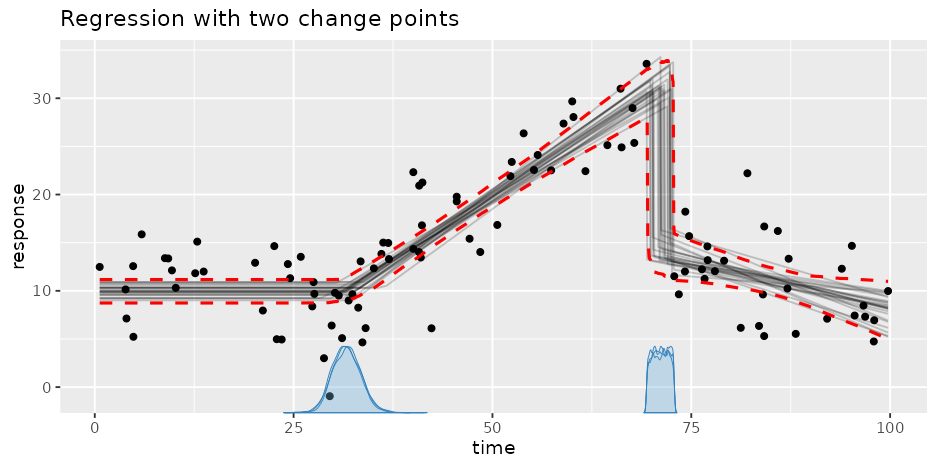
The default plot includes data, fitted lines drawn randomly from the
posterior, and change point(s) posterior density for each chain. Here we
also add the 95% central interval of the fitted values
(interval = "fitted"):
plot(fit, interval = "fitted") + ggtitle("Regression with two change points")
Use summary() to summarise the posterior distribution as well as
sampling diagnostics:
summary(fit)
## Family: gaussian
## Links: mu = identity; sigma = identity
## Draws: 9000 (3 chains with iter = 3000)
## Segments:
##   1: response ~ 1
##   2: ~ 0 + time
##   3: ~ 1 + time
##
## Change point parameters:
##    parameter   mean    sd  lower  upper rhat ess_bulk ess_tail    sim match
##  cp_1        31.7   1.8   28.4   35.3   1.00     3301     4250 30.0      OK
##  cp_2        71.15  0.99  69.47  72.78  1.00     3649     6590 70.00     OK
##
## Population-level parameters:
##    parameter   mean    sd  lower  upper rhat ess_bulk ess_tail    sim match
##  Intercept_1  9.94  0.66   8.62  11.22  1.00     4835     6307 10.00     OK
##  time_2       0.546 0.047  0.456  0.642 1.00     5165     6622  0.500    OK
##  Intercept_3 14.0   1.3   11.4   16.6   1.00     2306     4675 15.0      OK
##  time_3      -0.206 0.082 -0.366 -0.045 1.00     1287     2440 -0.300    OK
##  sigma_1      3.87  0.28   3.36   4.46  1.00     4455     4623  3.50     OK
rhatis the rank-normalized split-Rhat convergence diagnostic.ess_bulkandess_tailare the effective sample sizes for the bulk and tails of the posterior. Warning thresholds can be changed withmcp(..., diagnostics = list(rhat = 1.01, ess_bulk = 400, ess_tail = 400));summary()inherits these settings.- In this case, we simulated data using
mcp(see how indemo_fit$example_code) so the columnssimandmatchshow true value and whether it was recovered.
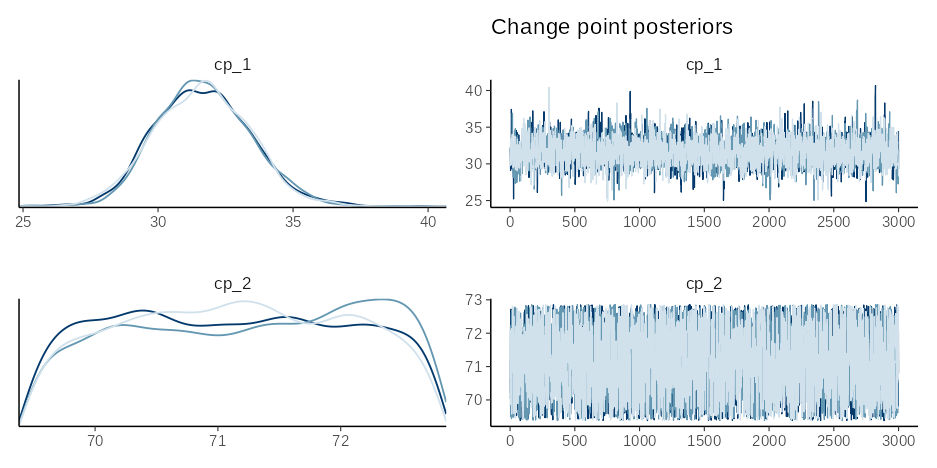
plot_pars(fit) can be used to inspect the posteriors and convergence
of all parameters. See the documentation of plot_pars() for many other
plotting options. Here, we plot just the (population-level) change
points. They often have “strange” posterior distributions, highlighting
the need for a computational approach:
plot_pars(fit, regex_pars = "cp_") + ggtitle("Change point posteriors")
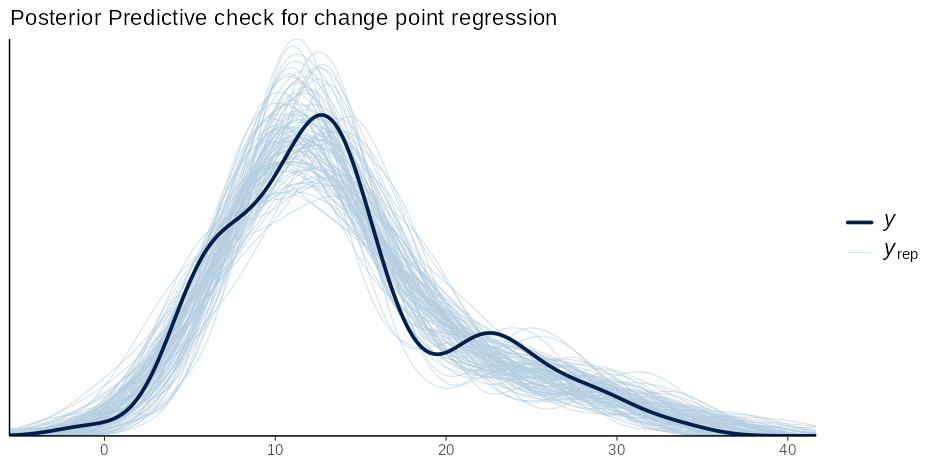
Do a posterior predictive check to see if the model recovers the empirical distribution in the data:
pp_check(fit) + ggtitle("Posterior Predictive check for change point regression")
You can expect most generics from R, posterior, tidybayes to work on
mcpfits. E.g., use fitted(fit) and predict(fit) to get fits and
predictions for in-sample and out-of-sample data, use as_draws(fit) to
get draws (see ?as_draws.mcpfit for all formats), etc.
Tests and model comparison
We can test (joint) probabilities in the model using hypothesis()
(see more
here). For
example, what is the evidence (given priors) that the first change point
(cp_1) is later than 30 against it being earlier than 30?
hypothesis(fit, "cp_1 > 30")
## # A tibble: 1 × 7
##   hypothesis     mean    sd lower upper  prob    BF
##   <chr>         <dbl> <dbl> <dbl> <dbl> <dbl> <dbl>
## 1 cp_1 - 30 > 0  1.67  1.79 -1.63  5.28 0.826  4.92
For model comparisons, we can fit a null model and compare the predictive performance of the two models using (approximate) leave-one-out cross-validation (see more here). Let’s specify a null model where the first two segments are reduced to one straight line, i.e., removing the change point:
# Define the model
model_null = list(response ~ 1 + time)  # Intercept_1 and time_1

# Fit it
fit_null = mcp(model_null, demo_fit$data)
Leveraging the power of loo::loo(), we see that the two-change-points
model is preferred (it is on top), and both p_worse and the
elpd_diff / se_diff ratio indicate this preference is strong:
fit_loo = loo(fit)
fit_null_loo = loo(fit_null)

loo::loo_compare(fit_loo, fit_null_loo)
##   model elpd_diff se_diff p_worse diag_diff diag_elpd
##  model1       0.0     0.0      NA
##  model2     -58.2     9.0    1.00
Learn more
The articles on the mcp website go
in-depth with the functionality of mcp:
Modeling
- Understanding mcp
formulas: how
segments connect (joined
~ 0 + xvs. disjoined~ 1 + x), parameter names,same(), and the model math. - Group-level (random)
effects:
group-level intercepts, slopes, and change points, e.g.,
(1 | id)andcp((1 | id)). - Variance and other distributional
parameters:
change points in, e.g., the residual SD using
sigma(1 + x). - Time series and
autocorrelation:
ar()andma()terms, including change points in autocorrelation.
Families
- Supported families and link
functions:
gaussian(),binomial(),bernoulli(),poisson(), andnegbinomial(). - Poisson and negative
binomial and
Binomial and
Bernoulli:
worked examples, including rates via
offset().
Inference
- Using priors and Default priors: set and check priors, including on change points.
- Hypotheses and model
comparison:
loo(), directionalhypothesis()tests, and Savage-Dickey Bayes factors. - Fits and
predictions:
fitted()andpredict(), including forecasting with future change points. - Plotting:
plot(),plot_dpar(),plot_pars(),pp_check(), and your ownggplot2plots. - Missing responses and imputation: change points in gaps of the data and imputations of missing responses.
Implementation
- From formulas to sampler
code:
how
mcpwrites the JAGS model infit$jags_code. - Diagnosing and fixing problems: convergence, speed, and common errors.
Citation
This preprint formally introduces mcp. Find
citation info at the link, call citation("mcp") or copy-paste this
into your reference manager:
  @Article{,
    title = {mcp: An R Package for Regression With Multiple Change Points},
    author = {Jonas Kristoffer Lindeløv},
    journal = {OSF Preprints},
    year = {2020},
    doi = {10.31219/osf.io/fzqxv},
    encoding = {UTF-8},
  }